Showing posts with label Questions & Suggestions From Other Players. Show all posts

Tuesday, December 30, 2014

Dear Readers

Hi everyone. 

I just wanted to tell you I am taking a break from Fashion Story and may not be on or blogging about it for a little while. I am still looking for ideas for blog posts, but have so far found nothing that sparked my interest. Thank you for visiting my blog and let me know if you have any suggestions either in the comments here or on my Questions & Suggestions page. I will continue to look for ideas during this break and I hope to be writing here again soon. 

Thank you and Happy New Year! ~ Sky's Limit

Sunday, March 23, 2014

5 How to Tips For Contestants and Contest Hosts in Regarding to Outfits: a Subject Suggested by moynistwo

Tip #1, Make Sure You Understand the Theme: Don't be afraid to ask questions or request further explanation. Not only does this help you do your best in the competition but it can help the contest host learn how to explain herself to her contestants. To my Contest Hosts out there, if you can tell that someone does not understand what you are asking then find a way to help them without making them feel humiliated or embarrassed. 

By understanding what you are dressing for, your outfit will be way better equipped for the contest and you've got a very good chance on making it to the next round.

Tip #2, Combine Matching and Colorful: Try to have matching items in your outfits but at the same time don't be afraid to add that pop or surprise item that can take your outfit to the next level. You want their first reaction to be "wow, this person did a great job" or anything like that.


This is something which I apply to more than just Fashion Story Avatar Contests. I also apply it to writing blog posts, drawing, the list goes on. 

Tip #3. Beautiful Can Be Less Coins: You might think that the more coins/gems an item is, the cuter it will be. This is not always the case, so I don't worry about the end cost of my outfit in real life or in Fashion Story. For instance for my Christmas Outfits I used some of the items you get for free in the beginning, at like level 80 (or something like that). Anyway, price isn't a defining factor in my choices for winners of my contests nor of what I wear for contests I am in.

Just something to think about and watch out for.

Tip #4. Accessories, Accessories and more Accessories: I know you have most likely heard this many times, but I happen to know that the accessories you chose can change an outfit from elegant to casual, basketball time to date time, etc. Pick your accessories with care and remember to experiment with what goes and what doesn't. 

Tip #5. Ask For Pointers From Contest Host if You Get Eliminated: If your outfit doesn't 'cut it' ask for the honest reasons and learn from their critic. Most of the ladies I know would gladly give pointers to their contestants and I know I have in the past though only when asked.  

To those of you who are contest hosts, keep in mind that you owe it to your voluntary contestants to make being in your contest as fun as you can. 

To those of you who are contestants, I hope this list helps you and I hope that you will have taken something away after reading this. 

If you have an idea of a good subject for a post please either leave via comment here or at Questions & Suggestions. Thank you! ~ Sky's Limit


Saturday, March 8, 2014

Girl World's Picnic Outfit, 2014


This is Girl World's Picnic outfit which she asked me to post on my blog. I love how the shoes work with the dress and the bracelet is a nice touch. Thanks for contributing!

If you want me to post one or more of your avatar's outfit, please leave a message on one of my Fashion Story walls (The Bat Cave or Sky's Limit). If you want more information or have a suggestion for a post please leave a comment! ~ Sky's Limit

Monday, February 24, 2014

Creating an Beautiful Outfit: A Tutorial Requested by Style N Fit

To start out with, you need to have an idea in your head what the outfit will be whether fancy or casual, dark or light, dull or bright, summer or winter you need to start with something. 


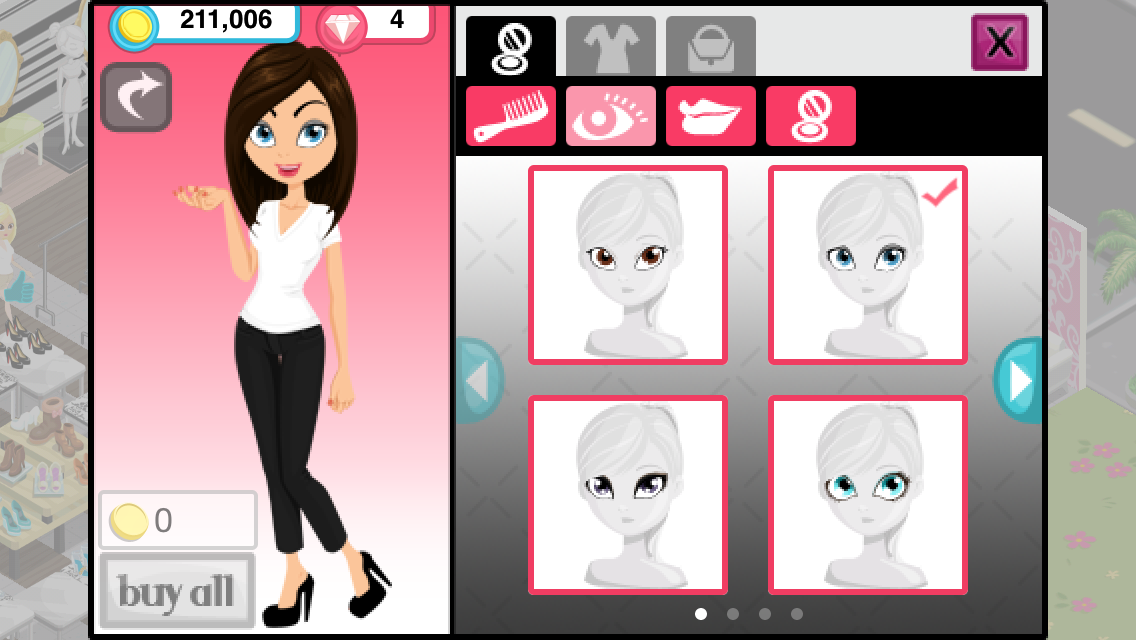
In this tutorial i will be showing you how to make this outfit, along with how to make your own with the 11 different things you can customize on your Fashion Story avatar.

The first 4 are your avatar's hair, eyes, lips and skin color. Though skin/hair color does not make an outfit, choose your lipstick and eye shadow carefully. I usually go simple until I finish my outfit and then go back and fancy it up if I want.


The next 3 things to customize are your avatar's shirt/dress, pants/leggings/tights, and shoes. This is where making your outfit really begins. Look around for a shirt to start off your outfit, and remember that anything you do can be changed so fell free to try something new!


In this case I went for the green dress/shirt (it depends on the outfit) to start out my outfit. Now to choose the pants. Like shirt you can try several different options until you find what you want.


In this case I found what I wanted pretty fast because I knew what I was going to do for this outfit. By  this time I had already decided to do blue and green, and I think it shows. Now for the shoes...


The next and last 4 things to choose are your accessories, such as purses, necklaces, bracelets, hats, glasses, etc. 


Always keep an eye out for affordable items that you can buy to go with your outfits, but at the same time remember you don't need every item in the closet.


Now that you've completed your outfit, you can either discard it and start over by pushing the grey arrow near the avatar's head or tap the pink X in the top right hand corner and save your avatar. 

Thank you Style N Fit for suggesting this post, if you have an idea for a blog post or questions about Fashion Story please leave a comment here or on my Questions & Suggestions Page.

Tuesday, January 21, 2014

How to Use PicMonkey: a Tutorial Requested By Style N Fit

Style N Fit was curious about my collages and asked me what I used to make them. I told her that I would post a tutorial to fully explain how I use PicMonkey.

Today I am going to edit this picture for my next post:


With PicMonkey, you can either Edit a photo, Create a collage or Design. I have yet to use design, but that is beside the point. Today I am going to create a collage and then edit it.


First thing we need to do is select the photo to edit:


Now that we have our photo, we need to design our collage:


You can change the arrangement of your squares and the size of your photo:


Also there are some available 'swatches' which you can use to enhance and brighten up your collage.


Now it is time to change the background color:


Because of I want to use this collage for, I want to change the size: 


Now its time to add text, overlays and more:


First I am going to add a frame, to give this picture a little more dignity:


Now we will add text: 


 You can use these themes if you are looking for a specific look:


But for now I will save my creation:


In a few hours I will post this picture in it's one post :), hope this answers your question Style N Fit and thanks for asking! Please feel free to ask any more questions you have via comments. ~ Sky's Limit